Report Address - MEX 12.x Region
This Tips are for Report configuration on MEX 12.x Region.
When you setup Company Details on MEX 12.x (Control Files > Company Details Tab) then the Report for all Sites will be the same.
Example :
User A from Site 1 creating Purchase Order.
User B from Site 2 also creating Purchase Order.
Company Details Tab was setup with Site 1 complete address
When you print out the Purchase Order Report then both users get the same address on that Report which is Site 1 complete address.
Tips :
If you want to get different address for both Sites then you have to go to
Control Files > Administration Functions > Security Users > Set Regions


When you setup Company Details on MEX 12.x (Control Files > Company Details Tab) then the Report for all Sites will be the same.
Example :
User A from Site 1 creating Purchase Order.
User B from Site 2 also creating Purchase Order.
Company Details Tab was setup with Site 1 complete address
When you print out the Purchase Order Report then both users get the same address on that Report which is Site 1 complete address.
Tips :
If you want to get different address for both Sites then you have to go to
Control Files > Administration Functions > Security Users > Set Regions
- Create New Region
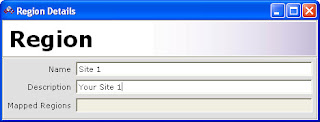
- Fill in Name and Description for your New Region (see Region Details Picture)
- Fill in details information of your Region


Comments
Post a Comment
Please register before posting your comment here !!